Here is a list of my Thread Patterns
One Ring Pattern
Zebra Pattern
Star Trek Anti-Pattern
Medusa Pattern
Yoda Pattern
See also my Queue Patterns.
Showing posts with label pattern. Show all posts
Showing posts with label pattern. Show all posts
Sunday, February 11, 2018

Thursday, February 8, 2018
Yoda Pattern
In the previous part, I talked about the Medusa Pattern, where I limited the number of threads. Now I want to go even further: I want to remove all threads.
 In fact, there is a particular case where threads are more of a nuisance. I am thinking about the small creature that likes the green color: the unit tests. As Yoda would say: “too much faith in threads you have”. When faced with multithreading in a unit test, you often have to revert to inserting sleep() commands, or performing some more complex tricks using wait() and notify() or equivalent.
But in reality, what you would really like to do is to get rid of the threads just for the testing. If you are using an Executor, it is not complicated to replace it with another one that executes the task in the current thread:
But in reality, what you would really like to do is to get rid of the threads just for the testing. If you are using an Executor, it is not complicated to replace it with another one that executes the task in the current thread:
Since we are using Java 8 (at least) and Executor is a functional interface, we can revert to use a lambda:Executor forTest = new Executor() {public void execute(Runnable command) {command.run();}};
And even better to use method reference:Executor forTest = command -> command.run;
Executor forTest = Runnable::run;
Sunday, February 4, 2018
Medusa Pattern
Last time, we saw the Star Trek Anti-Pattern, where the number of threads would go out of hands, to infinity and beyond.The easy solution to that is to limit the number of threads.
That is what I call the Medusa Pattern, from the name of that famous Gorgona that would freeze people by just looking at them. We are going to freeze the number of threads in a thread pool:
Now comes the big question: what should be ‘n’? How many threads should I have in my pool? The usual accepted answer is: as many threads as the number of cores, plus one because one thread is often in waiting. In his book “Concurrency in Practice”, Brian Goetz answers this question with this formula:
Where t is the number of threads, c is the number of cores in your machine, w is the waiting time, that is the average time your threads spend waiting, and s is the service time, that is the time your threads spend in average doing some useful work. You can see that if your threads are very busy, with almost zero waiting time, there should be as many threads as the number of cores, and we come close to the usual accepted rule of thumb.
On the other hand, if your threads spend a lot of time waiting, the value of t can be quite high. For instance, I work in a project where we have a monitoring application that monitors over 300 servers. Since monitoring threads spend their time waiting for a ping, we decided to have as many threads as servers.
We’ve seen cases with one thread, an infinity of threads, a fixed number of threads, but there is a special case where you do not want any thread. We’ll cover this in the Yoda Pattern. See you next time.
That is what I call the Medusa Pattern, from the name of that famous Gorgona that would freeze people by just looking at them. We are going to freeze the number of threads in a thread pool:
Executors.newFixedThreadPool(n);
Now comes the big question: what should be ‘n’? How many threads should I have in my pool? The usual accepted answer is: as many threads as the number of cores, plus one because one thread is often in waiting. In his book “Concurrency in Practice”, Brian Goetz answers this question with this formula:
t = c * (1 + w / s)
Where t is the number of threads, c is the number of cores in your machine, w is the waiting time, that is the average time your threads spend waiting, and s is the service time, that is the time your threads spend in average doing some useful work. You can see that if your threads are very busy, with almost zero waiting time, there should be as many threads as the number of cores, and we come close to the usual accepted rule of thumb.
On the other hand, if your threads spend a lot of time waiting, the value of t can be quite high. For instance, I work in a project where we have a monitoring application that monitors over 300 servers. Since monitoring threads spend their time waiting for a ping, we decided to have as many threads as servers.
We’ve seen cases with one thread, an infinity of threads, a fixed number of threads, but there is a special case where you do not want any thread. We’ll cover this in the Yoda Pattern. See you next time.
Saturday, January 27, 2018
Star Trek Anti-Pattern
In previous installments, we tried to limit the number of Threads to the minimum, even to one. But what happens if you go the opposite way?

Often, we try to parallelize some process, but do not want to pay too much attention to the number of Threads. We can try to spawn a new Thread each time we need one:
Executor myExecutor = Executors.newCachedThreadPool();
Often, things will work correctly at first. But as soon as the amount of data increases, you’ll get the following error:
You probably know this story: support team has a problem on the tool, so they have a look at the logs. They see this message, so they call you to ask what is the parameter to increase your application’s memory. You tell them about Xmx, but 5 minutes later, they call you again to ask how to run the application in 64 bits. That’s when you get suspicious, and ask for the logs.
In fact, this message is quite misleading for the unawares. You have to know that Java reserves some memory for storing Thread stacks, and that is the memory spaces that got scarce. One way to solve it is by decreasing the Xss, the size of a Thread stack in memory, but the best way is still to avoid going to infinity and beyond, that is to avoid the Star Trek Anti-Pattern.
So how many threads should I have? We’ll talk about it in the Medusa Pattern.
Often, we try to parallelize some process, but do not want to pay too much attention to the number of Threads. We can try to spawn a new Thread each time we need one:
Executor myExecutor = Executors.newCachedThreadPool();
Often, things will work correctly at first. But as soon as the amount of data increases, you’ll get the following error:
OutOfMemoryError: unable to create new native thread
You probably know this story: support team has a problem on the tool, so they have a look at the logs. They see this message, so they call you to ask what is the parameter to increase your application’s memory. You tell them about Xmx, but 5 minutes later, they call you again to ask how to run the application in 64 bits. That’s when you get suspicious, and ask for the logs.
In fact, this message is quite misleading for the unawares. You have to know that Java reserves some memory for storing Thread stacks, and that is the memory spaces that got scarce. One way to solve it is by decreasing the Xss, the size of a Thread stack in memory, but the best way is still to avoid going to infinity and beyond, that is to avoid the Star Trek Anti-Pattern.
So how many threads should I have? We’ll talk about it in the Medusa Pattern.
Sunday, January 7, 2018
Zebra Pattern
Last time I explained the One Ring Pattern, where only one thread handles the data coming from a queue. I also explained the reasons why such a pattern might be preferred.
One of those reasons is when ordering is important. Some events must keep the order in which they arrive in the queue, so handling them with one thread is a must. But what If there are many events, and I would really like to handle them on several threads? And what if the ordering is not compulsory between all events, but only between some of them? Using again the example from last time with market prices, order must be kept between prices on the same instruments. However, prices coming for different instruments can be handled in any order.
That’s when the Zebra Pattern comes handy. Imagine that each stripe of the Zebra is a different thread, with its own queue. When a price arrives, you put it on the queue reserved for this instrument. In that way, prices for one instrument will be ordered between them, while different instruments will be handled by different threads. To reduce the number of threads, you can use some modulo calculation, using an algorithm similar to the way hashmaps are dispatching keys between their buckets.
If this Pattern interests you, have a look at Heinz Kabutz’s Striped Executor Service.
We have so far tried to tie execution of data to one thread. What if we go the opposite way? Wait for the Star Trek Anti-Pattern.
Monday, January 1, 2018
One Ring Pattern
Last time, I finished talking about all my Queue Patterns. Now I’ll start with my Thread Patterns. Once you have your queues filled with tasks, the question that arises is: how many Threads do I need to deal with them?
Often enough, the answer to this question is: only one. The unique Thread. One Thread to bring them all and in the darkness bind them.
Often enough, the answer to this question is: only one. The unique Thread. One Thread to bring them all and in the darkness bind them.
Executor myExecutor = Executors.newSingleThreadExecutor();
But why would I want only one Thread while I could maybe go faster with several working in parallel? The first reason is that if I come from a place where there was no queues, and I just introduced one (see the Marsupilami Pattern), using only one Thread means less changes to my code. Everything will work more or less as before in this part of the code. There is less chance of introducing a regression.
Secondly, one thread means no concurrency, and therefore no synchronization problems. This also means simpler code, less bugs and less maintenance. Plus, if you’ve read Martin Thompson’s blog Mechanical Sympathy, you probably heard that one big performance problems of having several Threads accessing the same queue is contention. So there are real cases where using one Thread brings better performances.
Another reason for using one Thread is that, even if you have many Threads processing the data at hyper speed, there might be only one Thread having to deal with the consequences at the end. For instance, if you are developing a GUI, there is only one Event Thread for drawing everything, and having several Threads dropping more and more data at it will not serve your purpose.
Last, an important reason for keeping only one Thread is when ordering is important. For instance, if you have an application that displays prices from the market, and you have some very volatile instrument, if many updates are handled by several Threads, a newer price might be handled faster than an older one, and you will end up with your older price displayed in the end.
Even if you feel you are stuck with one Thread because of ordering, a solution still exists. I’ll describe it in the Zebra Pattern next time.
Thursday, December 28, 2017
Queue Patterns
Here is a list of all my Queue Patterns:
Next time, I can move to my Thread Patterns.
Next time, I can move to my Thread Patterns.
Wednesday, December 27, 2017
Opera Lift Pattern
In my last part, I presented the Godzilla Anti-Pattern, where you would merge so many messages that a monster size packet would be sent and have negative effects.
 In this part, I would like to present the Opera Lift Pattern. From all
the Patterns I presented in this serie, this one is the only one for
which I did not come up with the name. I leave all credit for the
pattern as well as for the name to our architect while I was working at
MyCom, Hugues Bouclier.
In this part, I would like to present the Opera Lift Pattern. From all
the Patterns I presented in this serie, this one is the only one for
which I did not come up with the name. I leave all credit for the
pattern as well as for the name to our architect while I was working at
MyCom, Hugues Bouclier.
The name of this pattern was inspired by the lift in the Opera metro station. If you’ve been there, I must point out that the name was not inspired because the lift is often not working, neither because of the smell. What characterize this lift is that it has a timer. When someone leaps in, the timer starts counting 30 seconds. That gives chance to more people to join. On one side, the lift has a maximum capacity, so you avoid the Godzilla Anti-Pattern. And on the other side, by waiting a bit, you avoid packets that are too small. Of course, if your lift is full, you might also choose to make it leave right away without waiting for the timer to end.
This is the last of my Queue Patterns. Next time, I can move over to the Thread Patterns.
In this part, I would like to present the Opera Lift Pattern. From all
the Patterns I presented in this serie, this one is the only one for
which I did not come up with the name. I leave all credit for the
pattern as well as for the name to our architect while I was working at
MyCom, Hugues Bouclier.The name of this pattern was inspired by the lift in the Opera metro station. If you’ve been there, I must point out that the name was not inspired because the lift is often not working, neither because of the smell. What characterize this lift is that it has a timer. When someone leaps in, the timer starts counting 30 seconds. That gives chance to more people to join. On one side, the lift has a maximum capacity, so you avoid the Godzilla Anti-Pattern. And on the other side, by waiting a bit, you avoid packets that are too small. Of course, if your lift is full, you might also choose to make it leave right away without waiting for the timer to end.
This is the last of my Queue Patterns. Next time, I can move over to the Thread Patterns.
Tuesday, December 26, 2017
Godzilla Anti-Pattern
Last time, I presented the Santa Claus Pattern, where you would send several messages wrapped up in the same packet to lower payload and increase performance.
However, if you create your packets without discrimination, sooner or later, you’ll meet Godzilla, the packet of monstrous size. Sending huge packets on your intranet can have quite a bad effects on all the other applications of your ecosystem. Some communication frameworks even forbid packets that are too big. For instance, I recently met Godzilla in a system using Weblogic, where maximum packet size is set to 50MB by default. Even more recently, I met a similar case with OmniOrb.
On a User Interface, big packets will make your windows seem to freeze. Although the processor is working at full speed to handle all your messages, the repaint will happen only after the whole packet is handled, and the user will not understand why nothing happens on the screen.
The way to handle Godzilla is of course to set a limit to the size of your packets. If we take the code from Santa Claus, a simple modification will help you avoid Godzilla:
private void sendData() {
if (!queue.isEmpty()) {
List<Message> packet = new ArrayList<>();
queue.drainTo(packet, MAX_PACKET_SIZE);
sendPacket(packet);
}
}
As a way to fight both Godzilla and its opposite, next time I’ll show the Opera Lift Pattern.
However, if you create your packets without discrimination, sooner or later, you’ll meet Godzilla, the packet of monstrous size. Sending huge packets on your intranet can have quite a bad effects on all the other applications of your ecosystem. Some communication frameworks even forbid packets that are too big. For instance, I recently met Godzilla in a system using Weblogic, where maximum packet size is set to 50MB by default. Even more recently, I met a similar case with OmniOrb.
On a User Interface, big packets will make your windows seem to freeze. Although the processor is working at full speed to handle all your messages, the repaint will happen only after the whole packet is handled, and the user will not understand why nothing happens on the screen.
The way to handle Godzilla is of course to set a limit to the size of your packets. If we take the code from Santa Claus, a simple modification will help you avoid Godzilla:
private void sendData() {
if (!queue.isEmpty()) {
List<Message> packet = new ArrayList<>();
queue.drainTo(packet, MAX_PACKET_SIZE);
sendPacket(packet);
}
}
As a way to fight both Godzilla and its opposite, next time I’ll show the Opera Lift Pattern.
Sunday, December 24, 2017
Santa Claus Pattern
In a previous post, I talked about the Water Drop Anti-Pattern, where the ratio of payload to data was leading to poor performances.  A way to alleviate this problem is to introduce the Santa Claus Pattern. Like Santa Claus, we will make packets. But instead of packing presents, we will pack several data messages into a bigger one. This way, the payload of sending this packet on the intranet will be insignificant compared to the useful data. Also, for a user interface, we will spare several repaints, leading to better performance.
There are of course several ways to implement this pattern. A possible solution is to use a timer:
public void init() {
executor = Executors.newSingleThreadScheduledExecutor();
executor.scheduleAtFixedRate(this::sendData, DELAY, DELAY,
TimeUnit.SECONDS);
}
private void sendData() {
if (!queue.isEmpty()) {
List<Message> packet = new ArrayList<>();
queue.drainTo(packet);
sendPacket(packet);
}
}
But be careful with this pattern, as you might wake up the Godzilla Anti-Pattern!
A way to alleviate this problem is to introduce the Santa Claus Pattern. Like Santa Claus, we will make packets. But instead of packing presents, we will pack several data messages into a bigger one. This way, the payload of sending this packet on the intranet will be insignificant compared to the useful data. Also, for a user interface, we will spare several repaints, leading to better performance.There are of course several ways to implement this pattern. A possible solution is to use a timer:
public void init() {
executor = Executors.newSingleThreadScheduledExecutor();
executor.scheduleAtFixedRate(this::sendData, DELAY, DELAY,
TimeUnit.SECONDS);
}
private void sendData() {
if (!queue.isEmpty()) {
List<Message> packet = new ArrayList<>();
queue.drainTo(packet);
sendPacket(packet);
}
}
But be careful with this pattern, as you might wake up the Godzilla Anti-Pattern!
Sunday, November 26, 2017
Water Drop Anti-Pattern
In my previous entries, I presented two patterns that allow you to limit the number of messages sent over a queue: the Indiana Jones Pattern and the Hamburger Pattern. The first one filters data while the second merges it.
 Once all your data is filtered and merged, messages still arrives individually, one after the other, on your queues. In some cases, it might introduce the Water Drop Anti-Pattern, where your data arrives like from a tap from which drops are falling one after the other.
Consider an application where you highest layer sends data through a network. Each individual message comes with a payload: it has a header which allows it to arrive to the correct destination. The smaller the message, the highest the payload.
If your highest layer is a user interface, your message will also have a payload: the repaint method which needs to be called after each update. Usually, this is the most expensive operation in your interface.
Next time, I will show a way to solve this problem: the Santa Claus Pattern. Wait for it!
Saturday, November 18, 2017
Hamburger Pattern
Last time, I introduced the Indiana Jones Pattern, where you would filter your messages in order to send less data on your overcrowded queue.
 Another way to reduce the number of messages is to use the Hamburger Pattern. Instead of separately sending the beef, the salad, the onion and the lettuce, why not send a complete hamburger at once? Imagine you are sending coordinates through the network. If you have two messages in your queue, one updating X, and another updating Y, you can merge both messages into one sending both coordinate changes at the same time. In the same way, if you have two messages, both updating X, you can also decide to merge them, sending only the second update.
This is more difficult than filtering, since you need to have access to your message queue and be able to remove messages from the middle. The default implementation of Thread Pools in Java uses queues that are optimized for adding at the end and removing from the front. Here, you will clearly need a different implementation.
public class Display {
public void run() {
while (true) {
Data data = queue.getNextMergeValue();
show(data);
}
}
}
}
After you filtered and merged all your data, you might end up running into the Water Drop Anti-Pattern. Next time!
Sunday, November 12, 2017
Indiana Jones Pattern
In my previous entry, I presented the Indian Train Anti-Pattern, where we add without discrimination data to handle on our queues, leading to overcrowded queues.
 One possibility to alleviate the problem is to use the Indiana Jones Pattern. In his Last Crusade, Indiana Jones had to go through three trials in order to prove himself worth of the Graal. We can imagine data going through a similar process to prove themselves worth of the access to the queue. We are in fact introducing a filter.
For instance, we do not wish to add to our queue an event telling us that data was not modified. Another example would be to send an event to our UI to notify of a data change for an item that is not even visible on the screen. We can imagine a large table with 10000 lines, but only 100 of them are displayed at a time.
public class Display {
public void show(Data data) {
Data prevData = getPrevData(data);
if (data.equals(prevData)) return;
if (!isDisplayed(data)) return;
SwingUtilities.invokeLater(() -> table.updateRow(data));
}
}
This is one way to reduce the size of the queue: drop some of the events. Next time we’ll see another way: the Hamburger Pattern. Stay tuned!
Sunday, November 5, 2017
Indian Train Anti-Pattern
Last time, I talked about the Marsupilami Pattern, where we introduce queues to transport data between application layers.
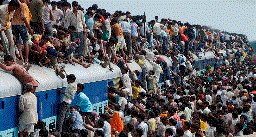 Now you’ve been using these queues for some time, conveying all sorts of data, and you realize that they are getting quite crowded, like those Indian Trains we see sometimes on TV. So crowded that people are standing on the roof. You might think that this is not a problem. Those are internal queues, so you can handle all this data internally, adding some more memory. Data might lag a little, but you are not doing “real time”, some seconds do not hurt.
But what if the Indian Train enters into the UI Thread? What if your user clicks on the menu bar, and the mouse events ends up at the end of the train. Would he want to use program where menus take several seconds to appear?
Or what if the Indian Train gets sent on the network? It might impact all the other applications sharing the network with yours, and they might not be happy playing the role of those sacred cows watching the Indian Train pass.
But what is to be done? Your Display class, for instance, is quite straightforward:
public class Display {
public void show(Data data) {
SwingUtilities.invokeLater(() -> table.addRow(data));
}
}
}
Data is received, data is displayed. So simple. But sometimes, simplicity is too naive. One possible solution is to use the Indiana Jones Pattern. Wait for it!
Wednesday, November 1, 2017
Marsupilami Pattern
In my previous entry, I described the Paratrooper Model, where each application layer would have its own thread pool for handling data. And the way to implement that is to use the Marsupilami Pattern.
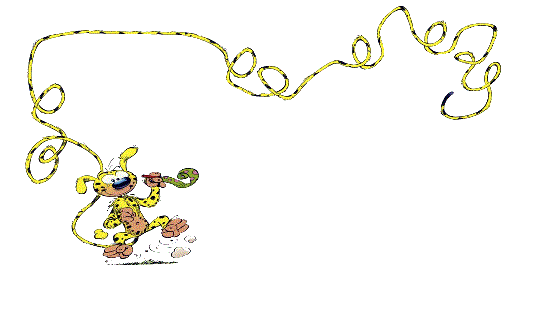
It might be that you haven’t heard of the Marsupilami. You have to know that there are three countries in the world where comic strips are akin to a cult: the US with Marvel and DC Comics super heroes, Japan with their mangas, and France. Growing up in France, my childhood was populated with comics characters such as Asterix, Tintin, Lucky Luke, or the Smurfs. Or the Marsupilami, a creature half way between the jaguar and the monkey, living in the Amazonian forest and who solves all his problems using a very long tail.
That makes for a nice pun in French, since we use the same word for tail and for queue, and here, we will solve our Paratrooper Model problem by introducing a queue. Each application layer is separated from the next one by a queue. When data is handled, we just push it to a queue, from which next layer’s threads will draw, while we can concentrate on our next data.
In Java, this is really easy. If we go back to our Calculator class from last time:
public class Calculator {
private final Executor executor = Executors.newFixedThreadPool(5);
public void push(Data data) {
executor.execute(() -> calculatePrice(data));
}
public void calculatePrice(Data data) {
data.price = data.unitPrice * data.quantity;
Display.show(data);
}
}
The important line here is the one where we create a new Executor. In Java, with this one line, you create two things: a thread pool, and a queue (the Marsupilami’s tail).
But beware, if you do not pay enough attention, you might end up with the Indian Train Anti-Pattern. Stay tuned!
Sunday, October 29, 2017
Paratrooper Model
In my previous entry, I was describing the Rocket Anti-Pattern, where one thread would handle too much work across several application layers, leading to communication buffer overflow and message loss.
 To solve this problem, you can use the Paratrooper Model. When paratroopers jump from a plane, they are not waiting for the previous guy who jumped to land safely on the ground before jumping themselves. They are jumping as soon as they can after the guy that precedes them left the place. It should be the same with your data. The thread that receives and transcodes the messages should only do that and nothing else. It should work as fast as possible, and let another thread go on with the work in the next application layer, while concentrating on the next message. This way, we are building a sort of pipeline, with one or several worker threads in each application layer.
Here is an equivalent of the application shown in the previous entry, using our new model:
public class Comm {
public void onMessage(Message m) {
Data data = transcode(m);
calculator.push(data);
}
}
}
public class Calculator {
public void push(Data data) {
executor.execute(() -> calculatePrice(data));
}
}
public void calculatePrice(Data data) {
data.price = data.unitPrice * data.quantity;
Display.show(data);
}
}
}
public class Display {
public void show(Data data) {
SwingUtilities.invokeLater(() -> table.addRow(data));
}
}
}
Each class represents a layer, and propagates the data to the next layer, which will in turn ask the layer’s dedicated thread to handle it.
To implement this model, you will have to use the Marsupilami Pattern. Wait for it!
Subscribe to:
Posts (Atom)